| |
Write data to a CAN bus
Description
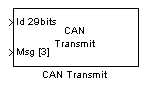
The CAN Transmit block allow to send CAN message containing between 1 and 8 bytes on a CAN Bus. The configuration of the BUS parameters are set using the CAN Configuration block. The two internal buffer of the CAN peripheral are used.
Dialog Box
-
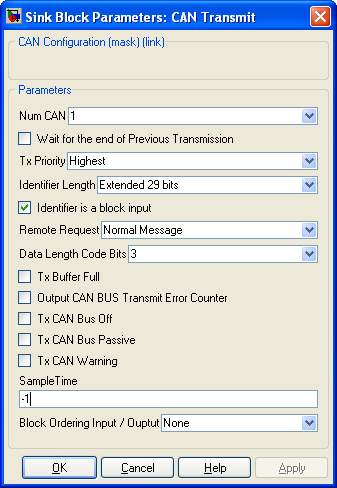
Ref to the CAN peripheral being configured (some PIC have two CAN bus)
- Wait for the end of Previous Transmission
-
-
When unchecked, the CAN Transmit block try to place the CAN Message into one of the two buffer available on the CAN peripheral. If both buffer are not empty, the message is not sent.
When checked, the CAN Transmit block try to place the CAN Message into one of the two buffer available on the CAN peripheral. If both buffer are not empty, the block will wait until one of the two buffer becomes empty (ie, once the message it contains is sent on the CAN bus). The empty buffer is then filled with the CAN Message and the execution of others blocks continue..
-
Each message is assigned to a priority. When the two buffer of the CAN Peripheral contains two message, the message with the highest priority is being sent first. Four priority level exist :
- Highest
- High
- Low
- Lowest
-
The message identifier is being code eigher with
- Standard 11 bits identifier
- Extended 29 bits identifier
- Identifier is a block input
-
-
If checked, the Message Identifier is defined throught a block input.
If unchecked, the Message Identifer is defined inside the dialog box (An Identifier parameters appears)
-
The message set the Remote Request bit. (see CAN doccumentation)
-
Length of the message you want to send. The message is contain up to 8 bytes. If message length is greater than 1, a vector of the message length is connected to the block input. The simulink bus creator block can be used to build a vector with the desired length.
- Tx Buffer Full
Tx CAN Bus Off
Tx CAN Bus Passive
Tx CAN Warning
-
-
Each of these checkbox output the requested binary error flag.
- Output CAN BUS Transmit Error Counter
-
-
The Transmit Error Counter output the internal CAN Transmit Error Counter. See CAN doccumentation for precision about Error Counter.
-
Sample Time
-
Sample time of the block. -1 for inherited
-
Block Ordering Input / Output
-
If you want to force the execution order of blocks that are not connected, this option allow to add either an input, an output or both to the block. These virtual connection allow to force the ordering of the blocks.
-
Info
-
Information
|
The Microchip name PIC, dsPIC, and MPLAB are
registered trademarks of Microchip Technology Inc.
MATLAB, Simulink, and Real-Time Workshop are
registered trademarks of The MathWorks, Inc.
| Lubin Kerhuel 's Website |
Contact : [adresse e-mail retirée] |
|
|


