FORUM TOPIC · READ ONLY
debugging with MPLAB
debugging with MPLAB
Forum : MPLAB IDE tricks
1 message(s) · archive en lecture seule
In order to debug code generated by RTW and Lubin's blockset in MPLAB v8.60 (where you can follow the execution of a program, set breakpoints, etc), I have found you need to do one of the following:
1) Manually create your own project, and manually add the .c and .h files to your project; compile and debug in MPLAB.
--or--
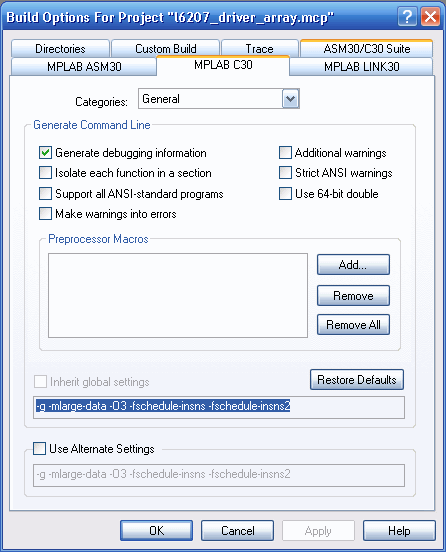
2) If double clicking on the project file (.mcp) created by Lubin's blockset, and you want to see program execution / set breakpoints, you need to turn on "Generate debugging information" in MPLAB under Build Options -> Project -> MPLAB C30. Otherwise, even if you compile a debug build, it will not show program execution or allow breakpoints.
Hope that saves someone some time!
Justin
1) Manually create your own project, and manually add the .c and .h files to your project; compile and debug in MPLAB.
--or--
2) If double clicking on the project file (.mcp) created by Lubin's blockset, and you want to see program execution / set breakpoints, you need to turn on "Generate debugging information" in MPLAB under Build Options -> Project -> MPLAB C30. Otherwise, even if you compile a debug build, it will not show program execution or allow breakpoints.
Hope that saves someone some time!
Justin