FORUM TOPIC · READ ONLY
How to configure PLL and maintain correct time
How to configure PLL and maintain correct time
Forum : Requirement, Installation & Configuration
9 message(s) · archive en lecture seule
Lubin - great blockset!
I'm currently evaluating if this would work for my current application.
I have the explorer 16 board with your example code up-and-running on it.
However, I am trying to understand how to increase the MIPS of the dspic33fj256gp710 to the max 40 mips without affecting the base time step of the model.
That is, I want to have the fastest processing speed, but maintain accurate real-time time steps. When I increase the dspic master to 40 MIPS, it clearly affects the time step of the model (the LEDs blink much faster, for example).
Can you help me understand how to increase the model to 40 MIPS and maintain the correct real-time time step?
Much appreciated!
Justin
I'm currently evaluating if this would work for my current application.
I have the explorer 16 board with your example code up-and-running on it.
However, I am trying to understand how to increase the MIPS of the dspic33fj256gp710 to the max 40 mips without affecting the base time step of the model.
That is, I want to have the fastest processing speed, but maintain accurate real-time time steps. When I increase the dspic master to 40 MIPS, it clearly affects the time step of the model (the LEDs blink much faster, for example).
Can you help me understand how to increase the model to 40 MIPS and maintain the correct real-time time step?
Much appreciated!
Justin
Re: How to configure PLL and maintain correct time
Citation : coolj When I increase the dspic master to 40 MIPS, it clearly affects the time step of the model (the LEDs blink much faster, for example).
Are you increasing the speed using the MASTER block ?
Time step should not be affected (make sure you recompile the model. Perhaps try to compile it twice ! (to make sure change are taken into account))
Please report it that's not working ! (bug ?)
Lubin
Re: How to configure PLL and maintain correct time
Thanks for the lightning-fast response, Lubin!
Yes, I increased the speed using the master block "Activate PLL" with MIPS=40000000. In fact, this is the only thing that I changed from the default example model for the explorer 16 board. It appears that the time step followed that, as the LEDs look to be blinking approximately 10x faster than before.
R2010b, blockset 3.3.
I tried re-compiling it again as you stated, but it's clear that changes are being implemented as when I uncheck "Activate PLL", the MIPS go down to 4e6 (as expected), and the LEDs blink at the correct rate.
I even tried compiling the project in MPLAB, with the same "fast time step" results.
Is there anything else I should try?
Yes, I increased the speed using the master block "Activate PLL" with MIPS=40000000. In fact, this is the only thing that I changed from the default example model for the explorer 16 board. It appears that the time step followed that, as the LEDs look to be blinking approximately 10x faster than before.
R2010b, blockset 3.3.
I tried re-compiling it again as you stated, but it's clear that changes are being implemented as when I uncheck "Activate PLL", the MIPS go down to 4e6 (as expected), and the LEDs blink at the correct rate.
I even tried compiling the project in MPLAB, with the same "fast time step" results.
Is there anything else I should try?
Re: How to configure PLL and maintain correct time
Are you using a bootloader ?
Bootloader typically do not program config registers where PLL and others parameters are stored.
Otherwise, Could you upload the modified model on the forum ? Something's wrong !
Lubin
Bootloader typically do not program config registers where PLL and others parameters are stored.
Otherwise, Could you upload the modified model on the forum ? Something's wrong !
Lubin
Re: How to configure PLL and maintain correct time
No bootloader being used. I'm programming it directly from ICD3.
I attached the model - it's exactly the same as the explorer 16 demo but with the PLL activated for 40 MIPS (based on the 8 MHz Explorer 16 xtal).
I attached the model - it's exactly the same as the explorer 16 demo but with the PLL activated for 40 MIPS (based on the 8 MHz Explorer 16 xtal).
Re: How to configure PLL and maintain correct time
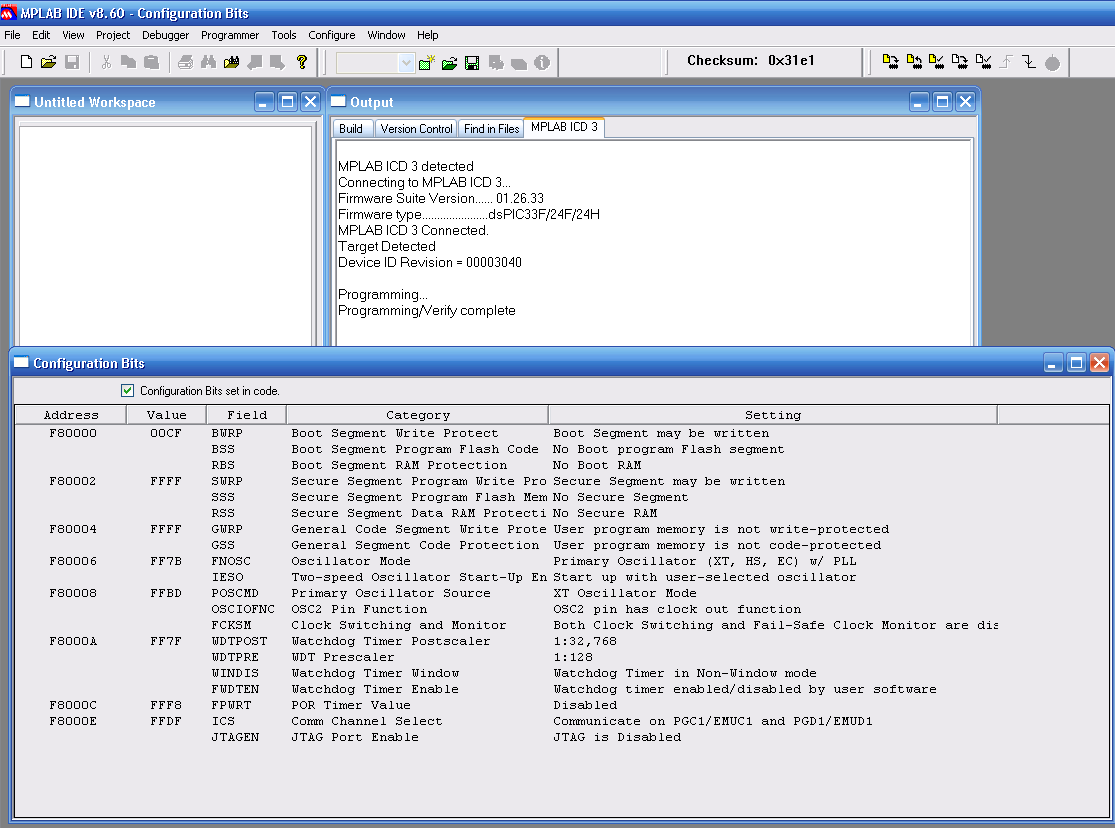
Could you check that, in MPLAB, the configuration bits are also programmed (because there is a checkbox option in MPLAB that force the configuration options bits with the current GUI config...)
Lubin
Lubin
Re: How to configure PLL and maintain correct time
Hi Lubin,
I believe I have the configuration bits set correctly in MPLAB to read from program code - I attached a screenshot for your verification.
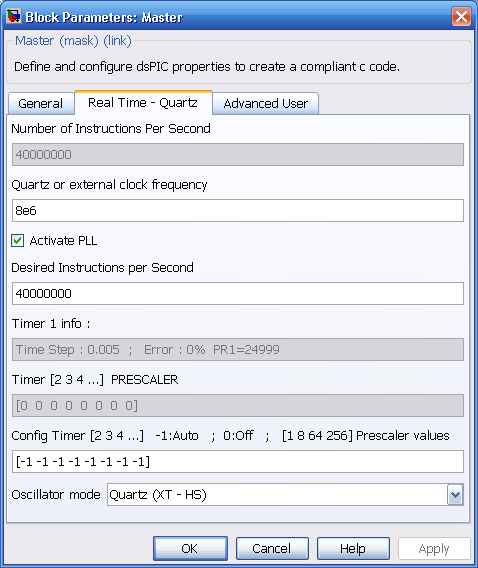
I also attached the exact window showing the updated MIPS / PLL setting.
Justin
I believe I have the configuration bits set correctly in MPLAB to read from program code - I attached a screenshot for your verification.
I also attached the exact window showing the updated MIPS / PLL setting.
Justin
Re: How to configure PLL and maintain correct time
RESOLVED.
For some reason, a re-load of Matlab seemed to solve the problem...anyway, it's working great now!
Thanks for your help, Lubin!
Justin
For some reason, a re-load of Matlab seemed to solve the problem...anyway, it's working great now!
Thanks for your help, Lubin!
Justin
Re: How to configure PLL and maintain correct time
Thanks for illustrating what I was talking about the Configuration bits. The picture shows a correct configuration.
Good to see the blockset working now.
Provided you could reproduce the bug, I would be glad to get the how you did so as to correct that problem !
Lubin
Good to see the blockset working now.
Provided you could reproduce the bug, I would be glad to get the how you did so as to correct that problem !
Lubin